Cancellations that still hold money
The cancellation digest is an email to your team, once a day. It lists the bookings cancelled in Trybe where a payment still holds money that Trybe shows as refundable: a card payment not yet refunded, cash or another manual payment, or a voucher. A cancelled booking with nothing left to give back is not listed.
The email reports what Trybe shows. How much to give back is your call, under your own cancellation policy.
When it arrives
Section titled “When it arrives”- Once a day, from 8 am in your site’s time zone. The digest checks every hour and sends at the first check from that hour. The hour is a setting on your digest.
- Each email covers the bookings cancelled since the one before. The first email comes the morning after we switch the digest on, and starts from the moment it was switched on. Earlier cancellations are not included.
- If an email cannot be sent, or Trybe cannot be read, the next hourly check tries again.
- After a long gap, an email reaches back at most 14 days.
- On a day with nothing to review, no email is sent. So a quiet inbox does not tell you the digest ran. A setting sends an email every day instead, saying nothing needs review.
Who gets it
Section titled “Who gets it”The addresses set on your digest. The subject names your site and the count, for example “Your Spa — 3 cancellations to review”.
If the digest covers more than one site, they share one email, and the rows do not say which site each booking was at.
What each row shows
Section titled “What each row shows”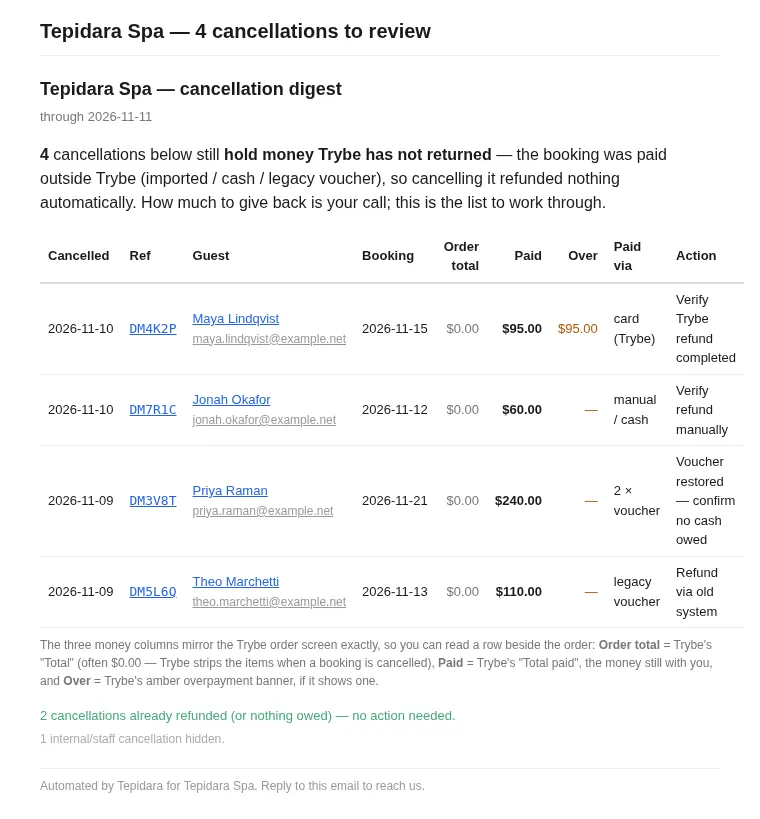
| Column | What it holds |
|---|---|
| Cancelled | The date the cancelled booking last changed in Trybe, usually the day it was cancelled, in your site’s time zone. Newest first. |
| Ref | The order reference. It opens the order’s payments in Trybe. |
| Guest | The guest’s name, which opens their client record in Trybe, and their email address, which starts an email to them about that booking. |
| Booking | The date the booking was for. |
| Order total | Trybe’s “Total” for the order. Often $0.00, because Trybe takes the items off a cancelled booking. |
| Paid | Trybe’s “Total paid”: the money still held. |
| Over | The overpayment Trybe shows on the order, if it shows one. |
| Paid via | How the money is held. When there are two of the same kind, it says so, for example 2 × voucher. |
| Action | What to check. |
The three money columns match the order screen in Trybe, so you can read a row beside the order. None of them is “the refund”.
The actions
Section titled “The actions”| Paid via | Action | What it means |
|---|---|---|
| card (Trybe) | Verify Trybe refund completed | A card payment that Trybe still shows as refundable. |
| manual / cash | Verify refund manually | Cash or another manual payment recorded in Trybe. |
| voucher | Voucher restored — confirm no cash owed | Paid with a Trybe voucher. |
| legacy voucher | Refund via your old system | A voucher that stands for credit brought over from an earlier booking system. We name your old system in the row when we set it up. |
When a booking was paid more than one way, the row shows the payment that needs the most attention. Money held outside Trybe’s card refunds comes before a card that Trybe can refund.
Below the table, the email counts the cancellations that need nothing (already refunded, or nothing was paid), and any staff or test cancellations it held back.
Staff and test bookings
Section titled “Staff and test bookings”Cancellations that look like staff or test bookings are left out of the table and counted at the bottom. A booking looks like one when its email address is at a test domain, such as example.com, or at your own staff domain once it is added, or when the name contains a word such as Test, Demo or QA. Your staff domain, and whether to show these bookings too, are settings on your digest.
Credit from an earlier booking system
Section titled “Credit from an earlier booking system”If your guests’ older credit was brought into Trybe as vouchers, the digest spots those vouchers by their type name, for example one containing “imported” or “legacy”. The names your imported vouchers use, and the name of your old system, are settings too, so the rows say where to refund.
Changing these settings
Section titled “Changing these settings”Every option on this page is a setting on your digest. If we set the digest up for you, ask us to change it.
Something wrong or unclear on this page? Tell us and we’ll fix it.