Read the Tip Health check
Tips can stop on one channel while a site’s total keeps moving, so a drop is easy to miss in the totals. The Tip Health check looks for that. It reads Trybe’s tips report for each site, splits the tips into two channels, and lists only the sites that need a look.
It only reads from Trybe. It never changes anything there.
Two channels
Section titled “Two channels”- Service: tips tied to a practitioner, such as a therapist.
- Front of house: tips with no practitioner, such as day-pass tips taken at the desk or at the exit.
The check watches one channel for a stop: front of house, unless we set it to service.
Where to find it
Section titled “Where to find it”In the console, go to Integrations, open your tip report integration, and under Checks choose Tip Health.
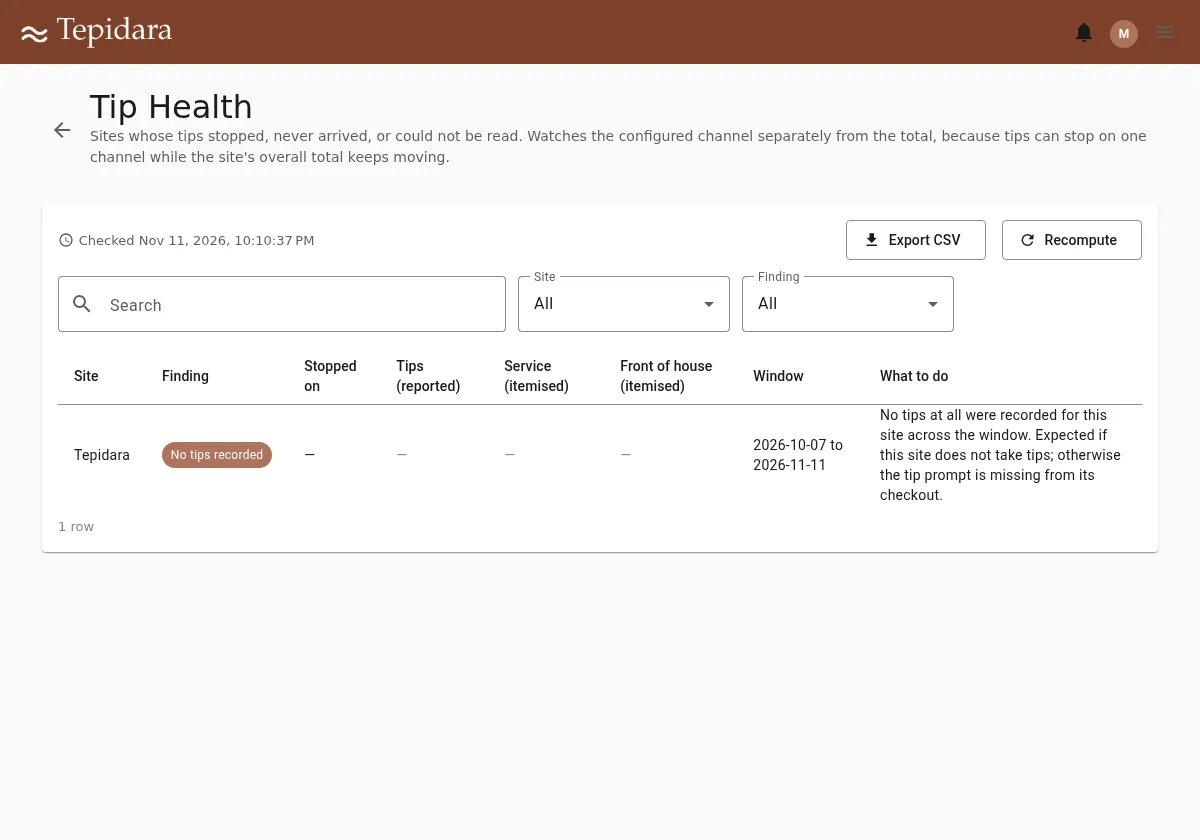
How fresh it is
Section titled “How fresh it is”- The check runs only when someone chooses Recompute. There is no daily run.
- A run covers the last 35 days up to today, by default, for each site set up on your Trybe connection. It reads every day of every site, so it takes a few minutes. You can leave the page.
- Checked at the top says when it last ran. The results are kept for two days. After that the board says the check has not run yet, and you choose Recompute again.
- If the board still says the check has not run a few minutes after Recompute, tell us.
What a row means
Section titled “What a row means”A site whose tips look normal is not a row.
| Finding | What it means |
|---|---|
| Tips stopped | The watched channel fell to one tip a day or fewer (by default) and stayed there to the end of the window, after at least one busier day. Stopped on is the first such day. Check that the tip prompt is still switched on for that channel’s checkout. |
| No tips recorded | No tips at all for the site in the window. Expected if the site does not take tips. |
| Not checked | Trybe did not return tips for this site, or the channel split failed. Nothing was checked there. It is not a clean result. Choose Recompute; if it stays, the Trybe connection may not cover that site. |
The columns
Section titled “The columns”| Column | What it holds |
|---|---|
| Site | The Trybe site. |
| Finding | See above. |
| Stopped on | For Tips stopped, the first day of the drop. |
| Tips (reported) | The tip total from Trybe’s tips report, for the window. |
| Service (itemised) | The service tips in that report, added up one by one. |
| Front of house (itemised) | The front-of-house tips, added up the same way. |
| Window | The dates the run covered. |
| What to do | The next step for that row. |
Tips (reported) and the two itemised columns are two readings of Trybe’s report. They can differ slightly, in either direction, so they will not add up exactly.
Worth knowing
Section titled “Worth knowing”- The window ends today. Early in the day the watched channel may not have reached its usual count yet. A Tips stopped row dated today can be just that: recompute later in the day before you act on it.
- The board is read the same way as the other checks. See Using a check.
Something wrong or unclear on this page? Tell us and we’ll fix it.