HSA/FSA payments with TrueMed
Guests can pay with their HSA or FSA card through TrueMed. They choose Pay with HSA/FSA at checkout, answer TrueMed’s questions and enter their card on TrueMed’s pages, and come back to your confirmation page. The order is placed in Trybe only once TrueMed has taken the payment.
Who decides eligibility
Section titled “Who decides eligibility”TrueMed does. Neither your team nor we decide whether a service or a guest qualifies.
- Your services. We send your sessions and appointments from Trybe to TrueMed’s product catalog. TrueMed reviews each one and marks it eligible, eligible with a letter of medical necessity, or not eligible.
- Your guests. TrueMed asks the guest a short health survey on its own pages. Where a letter of medical necessity is needed, a clinician reviews it before TrueMed takes the payment.
What guests see
Section titled “What guests see”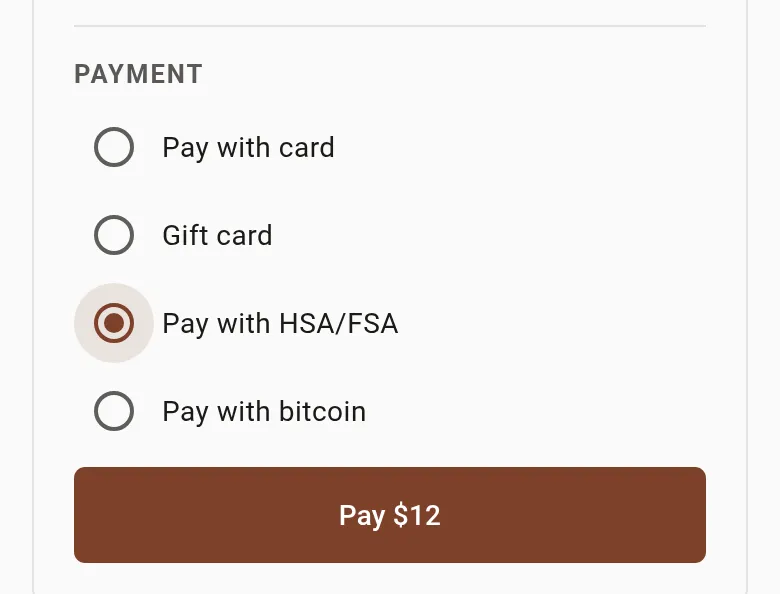
- Pay with HSA/FSA at checkout. On your Trybe booking site it is a button near the end of the checkout form. On the Online Shop it is one of the ways to pay, as above. Either way, the guest fills in their details first.
- A note before they leave (Trybe booking site only). A window titled Pay with HSA/FSA says: “You may be eligible to pay for your visit using your HSA/FSA card through Truemed. You will be redirected to complete a brief health survey and enter your payment details.”, with Go Back and Continue. We can change the wording.
- TrueMed’s pages: the survey, then their payment details.
- Your confirmation page. If TrueMed has already taken the payment, the order is placed. If TrueMed is still reviewing, the page says Verifying your HSA/FSA payment….
If TrueMed turns the payment down, or the guest cancels, no payment is recorded in Trybe and the order is not placed. A guest who is still on TrueMed’s pages when that happens is sent back to the checkout to pay another way.
If a promo code or gift card already covers the whole order, there is nothing to pay through TrueMed and the order is placed the usual way.
When the order is placed
Section titled “When the order is placed”Only when TrueMed has taken the payment. While a clinician is still reviewing, the order is not placed in Trybe yet. The review typically takes one to three hours.
TrueMed tells us when it takes the payment, and we also check waiting HSA/FSA payments every five minutes, so the order is placed even if the guest has closed the page.
How much the guest pays
Section titled “How much the guest pays”What the order still owes: the total after promo codes, Trybe gift cards and anything already paid.
HSA/FSA does not start while a card payment the guest already opened on the same order is still open. They finish that payment, or let it lapse, then choose HSA/FSA again.
What it does in Trybe
Section titled “What it does in Trybe”When TrueMed has taken the payment:
- A paid payment goes on the order, under the payment type set up for HSA/FSA.
- A note on the order gives TrueMed’s payment reference, for example “TrueMed Payment: …”.
- Your order label goes on the order, if you chose one.
- The order is placed, and Trybe’s order summary email goes to the guest, unless it has already been sent.
When the amounts don’t match
Section titled “When the amounts don’t match”- The order changed during the review. If a gift card or promo code was added, or an item changed, while TrueMed was reviewing, what TrueMed took may not match what the order now owes. The order is still placed, Trybe records no more than the order owes, and a note on the order gives the difference: an amount to refund on TrueMed, or an amount still to collect. The note gives amounts in cents.
- Paid twice. If the order was already paid another way before TrueMed took the payment, Trybe cannot take the second payment. The order is placed once, a note beginning DOUBLE CHARGE goes on it saying which payment to refund, and we are alerted. Nothing is refunded automatically.
What we set up with you
Section titled “What we set up with you”- Your TrueMed merchant account, connected to your Trybe site.
- Product codes. Give each session and appointment you want TrueMed to review a product code in Trybe. One without a code is not sent to TrueMed, and TrueMed cannot match it at checkout. The same product code at several of your sites is sent once.
- What we send TrueMed: all your sessions and appointments with a product code, or only the categories you choose. Each item goes with its name, description and picture.
- A payment type in Trybe for HSA/FSA payments.
- The button on your Trybe checkout, and the HSA/FSA choice on the Online Shop if you have one, with your wording.
- An order label for HSA/FSA orders, if you want one.
Something wrong or unclear on this page? Tell us and we’ll fix it.