Read the revenue reconciliation
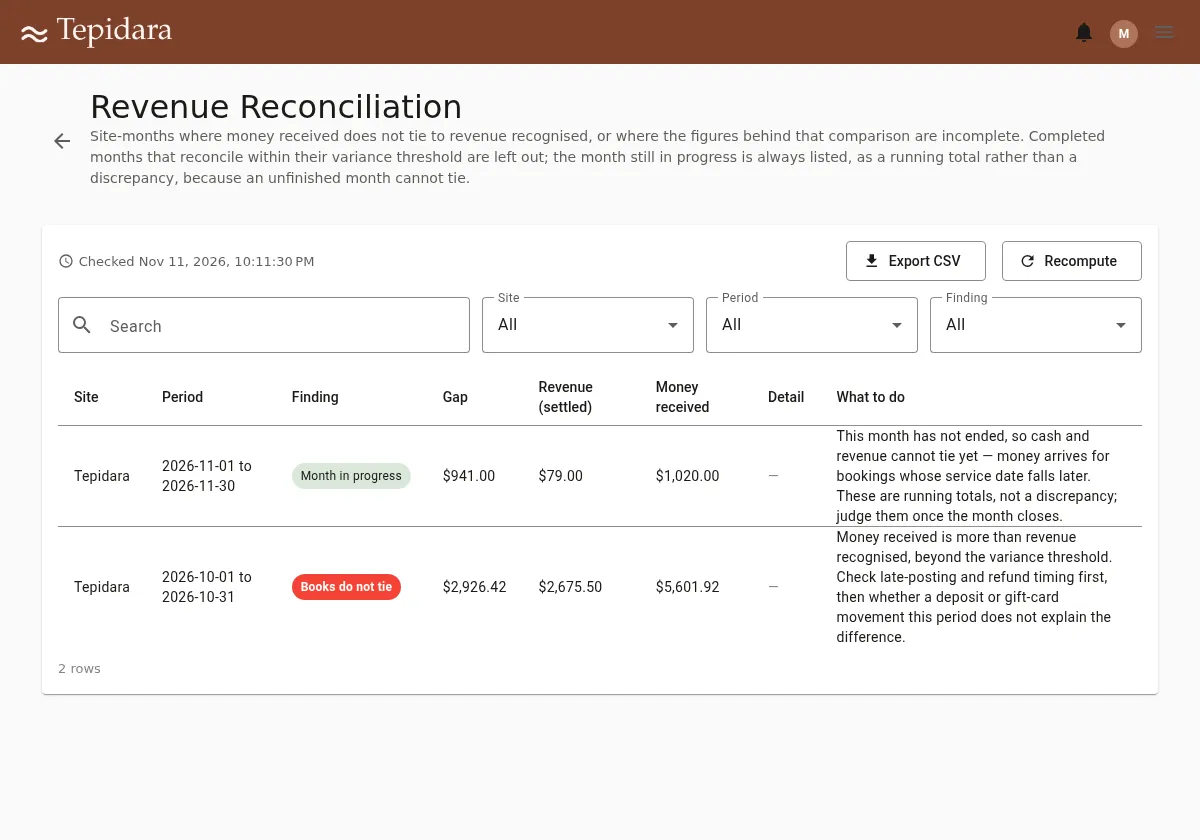
Trybe’s Sold items report counts sales by revenue date. Its Transactions report counts money by the day it moved. The two never line up on their own. This check puts both on the same footing. For each site and month, it compares the revenue Trybe recognised with the money Trybe recorded as received, both by revenue date, and lists the months that need a person.
It only reads from Trybe. It never changes anything there.
Where to find it
Section titled “Where to find it”In the console, go to Integrations, open your revenue reconciliation integration, and under Checks choose Revenue Reconciliation.
How fresh it is
Section titled “How fresh it is”- Once a day by default, the check works out this month and last month for each site set up on your Trybe connection.
- The board shows the results of that run. Checked at the top says when the newest figures were worked out. While the board is open, it looks for new figures every minute.
- Recompute starts the same run straight away. Each site and month is worked out on its own, so the results arrive over the next few minutes. You can leave the page while it runs.
What a row means
Section titled “What a row means”Only the months that need a look are rows. A finished month whose figures agree within the tolerance is not listed.
| Finding | What it means |
|---|---|
| Month in progress | This month. It is always listed, and it is not a problem. Money arrives for bookings whose visit falls in a later month, so a month cannot tie until it has ended. Judge it once the month closes. |
| Books do not tie | A finished month where money received and revenue differ by more than the tolerance. By default the tolerance is $500 or 1% of the month’s settled revenue, whichever is larger. |
| Figures incomplete | Part of the data could not be read from Trybe, so the gap cannot be trusted either way. Detail says what was missing. This is listed even for the month in progress. |
| Not computed | There are no figures for this site and month, so nothing has been checked for it. It shows once other months have figures. Until then the whole board says the check has not run yet. |
The columns
Section titled “The columns”| Column | What it holds |
|---|---|
| Site | The Trybe site. |
| Period | The month, as its first and last day. |
| Finding | See above. |
| Gap | Money received minus revenue. Above zero, more money came in than revenue was recognised. Below zero, less. |
| Revenue (settled) | Sales on orders that are settled in Trybe, by revenue date. It comes from Trybe’s full sold-items export, so it is not cut short by the row limit on the on-screen report. |
| Money received | Payments minus refunds, by revenue date, for every payment method Trybe records: card, vouchers, cash and other manual payments. A gift card used to pay counts here, as it does in Trybe’s Transactions report. |
| Detail | For Figures incomplete, what could not be read. |
| What to do | The next step for that row. |
On a phone, Revenue (settled), Money received and Detail are hidden. Export CSV has every column.
What to do about a row
Section titled “What to do about a row”- Books do not tie: check late postings and refund timing first. Then check whether a deposit or gift card movement that month explains the difference.
- Figures incomplete: choose Recompute. If it stays, run Trybe’s ledger-lines export for that site and month.
- Not computed: choose Recompute and come back in a few minutes. If it stays, the run for that site is failing. Tell us.
Using a check
Section titled “Using a check”The same screen shows every check in your console, so these points apply to the others too.
- Search, and the filters above the table, narrow the rows. Clear resets them.
- Export CSV downloads every row and column, whatever the search and filters. The file starts with when the data was worked out and who exported it. It is only offered once the check has run, because an empty file would read as “nothing wrong”.
- “This check has not run yet” means nothing has been checked. It is never an all-clear.
- “This check could not run” gives the reason. Tell us if it stays.
Something wrong or unclear on this page? Tell us and we’ll fix it.